

European roulette



At Wizardo casino we do not rely on a classic app from the App Store or Google Play. Instead, we offer you an installable Progressive Web App (PWA). You add Wizardo casino directly to your home screen via your browser and then launch our mobile version with a tap.
This means you have quick access to slots, missions, promotions, and your account on iPhone, iPad, Android smartphone, or tablet. Our PWA is particularly convenient if you regularly play on mobile and do not want to type the address in the browser every time.
Is there a real Wizardo casino app?
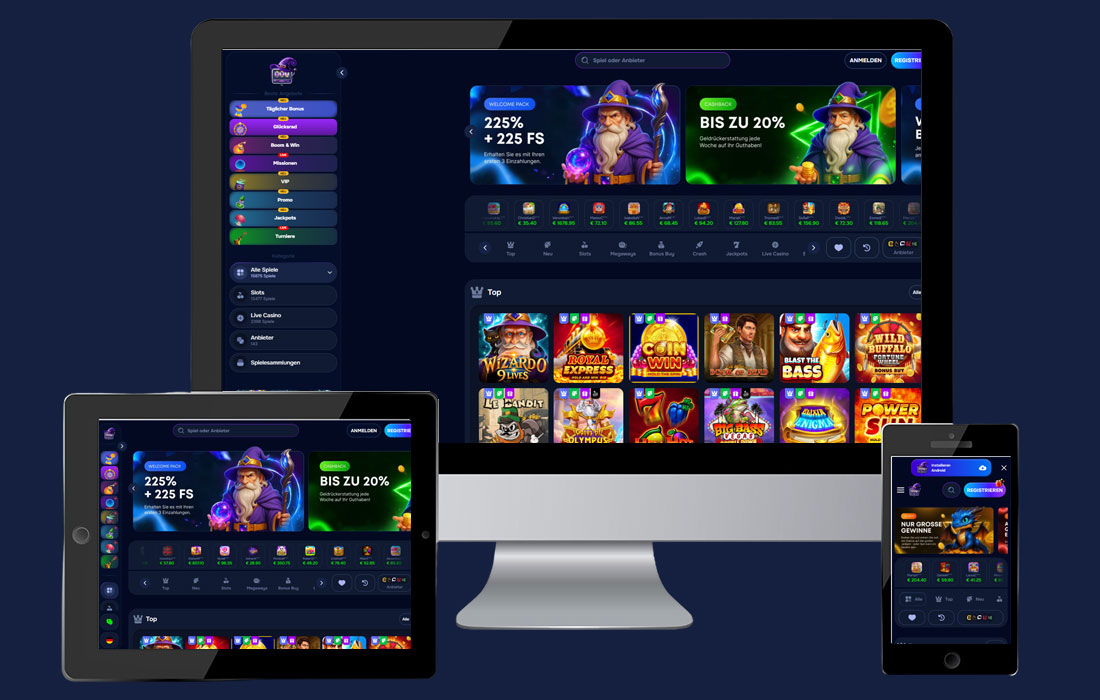 A classic Wizardo casino app as a download from the App Store or Google Play is not required. Our mobile version works as a Progressive Web App and is set up directly via the browser on your device. After adding it, the Wizardo icon appears on your home screen, so you can open our casino similarly to a regular app.
You do not need a store download, no additional installation file, and no manual update. Once the PWA has been added, you can log in, launch slots, check your account, and conveniently access the mobile casino sections.
Installing Wizardo casino on iOS (iPhone & iPad) – in 3 steps
- Open the page in Safari
Open Wizardo casino on your iPhone or iPad in the Safari browser. - Tap "Share"
Tap the Share icon at the bottom (square with an arrow pointing upwards). - Add "To Home Screen"
Select "Add to Home Screen", confirm the name, and tap "Add".
The Wizardo casino icon will then appear on your home screen. You can launch our PWA directly from there from now on, without having to open Safari and navigate to the website manually each time.
Installing Wizardo casino on Android – in 3 steps
- Open the page in the browser
Open Wizardo casino preferably in Google Chrome or another PWA-capable browser. - Open the menu
Tap the three dots in the top right corner of the browser menu. - Install / Add to Home Screen
Select "Add to Home Screen" or "Install app" and confirm with "Add".
After installation you will find Wizardo casino on your Android home screen. Our PWA opens quickly and feels similar to a regular mobile app in everyday use.
Why the Wizardo PWA?
With the Wizardo PWA you open our lobby more quickly, reach your account with a tap, and can launch slots, missions, and promotions directly from the home screen. This is more convenient than searching for the website in the browser every time, especially when you are on the go.
- Quick access: Wizardo casino opens via an icon on your home screen.
- No store app needed: you install our PWA directly via Safari, Chrome, or another suitable browser.
- Convenient for casino sessions: slots, account, missions, and promotions remain accessible on mobile.
- App feel without detours: our PWA launches with a tap and is suitable for smartphone and tablet.
- Automatic updates: updates run via the website without you needing to manually install a new version.
Wizardo casino without APK and without "Unknown Sources"
 For Wizardo casino you do not need an APK file. Our mobile application is added to the home screen as a PWA directly via the browser. You therefore do not need to download any external files or enable "Unknown Sources" in the Android settings.
This keeps the setup simple: open the website, use the browser menu, add to the home screen, and then launch it via the Wizardo icon. This gives you an app-like experience without needing to search for a separate installation file.
What can you do in the mobile Wizardo casino version?
Our mobile version is not just for launching slots. You can register or log in, manage your account, check your balance, and access the available casino sections. Missions, promotions, and bonus offers also remain accessible on mobile.
If you play regularly, the PWA offers you above all quick access. You can jump straight to the lobby, check new promotions, or continue your session without having to search for the page in the browser first.
Mobile or desktop – you decide
Wizardo casino also works as normal in the desktop browser. If you want to play on the go, our PWA is the quick solution. If you prefer to play on a laptop or PC, everything stays as usual: log in, select a slot, spin.
You therefore do not have to choose between desktop and mobile use. Your account remains the same; only the access changes: on the computer via the browser, on mobile either via the browser or via the PWA icon on the home screen.
Problems with the Wizardo casino app?
If the PWA does not start correctly or a game does not load, first refresh the page and open Wizardo casino again. It also often helps to briefly close the browser and then restart it. Also check whether your internet connection is stable.
If the problem persists, try a different browser, clear cache and cookies, or check whether a VPN, ad blocker, or very strict security settings are blocking the site. If nothing works, contact our support and state your device, your browser, and the exact problem.
FAQ
Why does Wizardo casino use a PWA instead of a classic app?
We use a PWA so that you can install our mobile version directly via the browser. This means you do not need an App Store, no Google Play download, and no additional file. After adding it to the home screen, Wizardo can be opened similarly to a regular app.
Is installation free?
Yes, adding the Wizardo PWA to the home screen is free. All you need is your smartphone or tablet, a compatible browser, and an internet connection. Costs only arise if you later voluntarily deposit money into your casino account.
Is Wizardo casino available for iOS and Android?
Yes, the Wizardo PWA can be used on iOS and Android. On iPhone and iPad you install it via Safari, while Android users can use Chrome or another PWA-capable browser. The icon then appears directly on the home screen.
Do I need to enable "Unknown Sources"?
No, that is not necessary. "Unknown Sources" is only relevant for APK files, but Wizardo casino is not installed via an external APK. Our PWA is added directly via the browser, which makes the setup considerably simpler.
Is the Wizardo PWA the same as an APK?
No, a PWA is not an APK file. An APK has to be downloaded as a file and installed on Android, whereas a PWA is added to the home screen via the browser. A separate APK download is therefore not required for Wizardo casino.
What can I do if the Wizardo PWA does not load?
First refresh the page and restart the browser. If that does not help, clear cache and cookies or try a different browser. If you are using a VPN or ad blocker, temporarily disabling it may also help.
Can I play Wizardo casino without the PWA?
Yes, you can also open Wizardo casino directly in the mobile browser. Our PWA is simply a more convenient option because you can launch the casino more quickly via an icon on the home screen. On desktop, Wizardo continues to work as usual in the browser.
Important note
Playing at Wizardo casino is only permitted for adults (18+). Gambling should remain entertainment and should not be seen as a way to earn money. Only play with amounts you can afford, and take breaks if playing no longer stays relaxing.